Deposit - Withdraw - Transfer

E - Payment

ODD : E-Payment Online Money Transfer Service

  • The system will update the credit limit immediately in real time after the customer makes an online money transfer. The customer does not need to notify the deposit of security again.
  • After the customer applies for the E-Payment service, they can start using it immediately.
How to apply online
BankMobile  Channel
Website Channel
Kasikorn Bank
Siam Commercial Bank -
Bangkok Bank

Applications and Website for Accessing the "My Service" Menu
K-Cyber Trade


Streaming


KS Trade+


efin Trade Plus


KS One


KS Trade Website


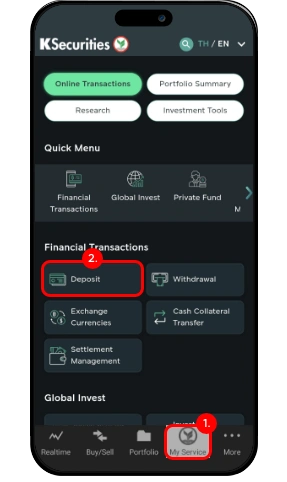
1. Go to the My Service menu.

2. Select Deposit.

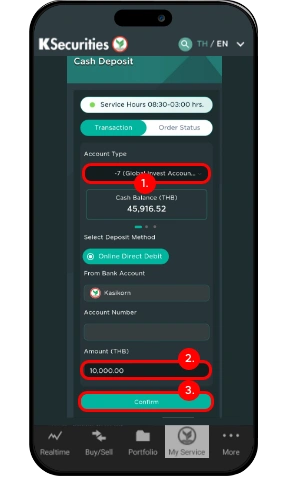
3. Select the Account Type and choose Online Direct Debit as the Deposit Method.

4. Enter the deposit amount (Minimum 100 THB) and Tap Confirm to review the deposit order details.

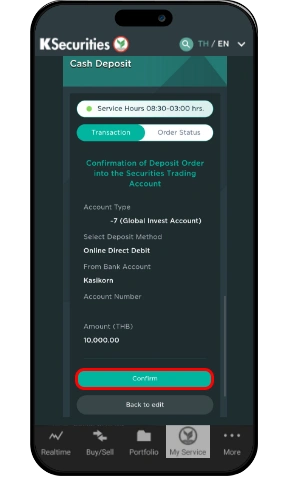
5. Confirm the details of your deposit order. If the information is correct, tap Confirm to proceed with the transaction.

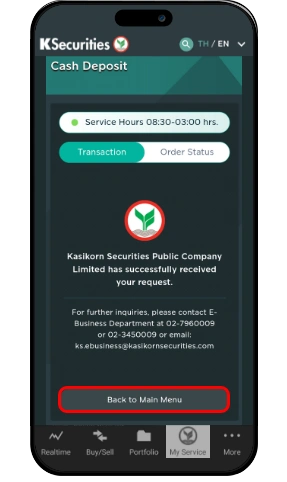
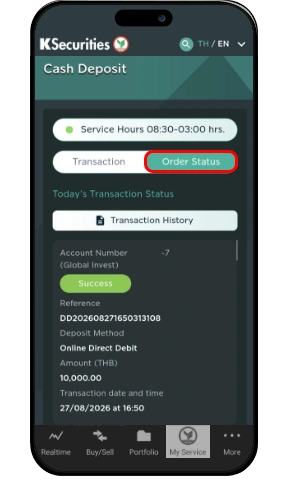
6. After the transaction has been successfully completed, you may view the details in the Order Status tab.

Comprehensive Guide to Depositing Collateral via Online Direct Debit

Terms and Conditions
  • The company will deduct the funds from your bank account and immediately increase your purchasing power after the transaction has been completed. However, if the deposit amount exceeds the company’s specified limit, the maximum purchasing power will be capped at the company’s defined limit. If you wish to increase your limit, please contact your Equity Wealth Manager.
  • Deposit transactions are available from Monday to Friday, excluding weekends and public holidays as announced by the Bank of Thailand. The service is provided during the following time periods:
    - 08:30 - 19:00: Online Direct Debit (ODD) and QR Code
    - 19:00 - 03:00: QR Code only
  • The minimum deposit amount for Online Direct Debit is 100 THB.

Search

Recommended searches